How to build a direct booking website that answers every question a guest has
Guests do not book a website. They book an answer to a worry: is this place real, what will it really cost, and what happens if something goes wrong? Here is how to build a direct booking site around those questions, plus five platforms that can host it.
Key points
- A direct booking website wins when it answers the guest's questions before they have to ask: is it real, what is the full price, where exactly, is the host trustworthy, what if it goes wrong, how do I check in.
- Ten page elements do most of the work: photos, an all-in price, a live calendar, reviews, a location guide, house rules, a cancellation policy, an FAQ, a host story and a fast way to ask a question.
- For most operators the right move is to use the website builder inside their property management system, then spend the effort on photos, copy and trust, not on custom code.
- SEO for a rental site is mostly basics done well: one clear page per property, original text, fast mobile pages, and helpful guides for the area.
Every direct booking is a small act of trust. The guest has never met you, they are about to send a few hundred or a few thousand dollars to a website they found five minutes ago, and a big marketplace is one tab away. Your site has to do the job that Airbnb's reviews, payment protection and familiar layout do for them.
The way to do that is to stop thinking in pages and start thinking in questions. This guide walks through the ten questions that sit in a guest's head, shows which part of your site should answer each, and then covers the platform choice, the SEO and the launch checklist.
Why bother with a direct booking website
Marketplaces send you guests, and they charge for it. Airbnb, for example, says it charges a service fee on every confirmed booking, using either a split-fee or a single-fee structure1. Other channels have their own commission models. A direct booking skips that channel fee. You still pay payment-processing costs and the software that runs the site, so the saving is real but not total.
The bigger prize is not the fee. It is the relationship. When a guest books on a marketplace, the marketplace owns the customer, the review history and the next search. When a guest books on your site, you have their email, you control the message, and a happy guest can rebook without paying anyone a commission. Over a few years that repeat business is what turns a set of listings into a brand.
Direct booking is not a replacement for marketplaces. New guests still mostly find you there. Think of the marketplaces as the way strangers meet you and your website as where the relationship continues. To see what the fee difference is worth for your own numbers, try the direct booking savings calculator, and check the full picture of costs in the STR profit calculator.
The ten questions in your guest's head
Next to every question is the part of your site that should answer it. If you cannot point to the answer on your own site, a guest will go back to a marketplace that can.
| The guest wonders | Your site answers with |
|---|---|
| Is this place real, and what does it look like? | Honest photo gallery and a short video or floor plan |
| What will I pay, all in? | Price breakdown before checkout |
| Is it free on my dates? | Live availability calendar |
| Can I trust the host and the place? | Reviews, host story, business details |
| Where exactly is it, and what is nearby? | Map, area guide, travel times |
| What are the rules? | Plain-language house rules |
| What if my plans change or something goes wrong? | Cancellation policy and a named contact |
| How do I get in? | Check-in and arrival section |
| Can I ask something first? | Fast contact options and a real FAQ |
| Is paying here safe and easy? | A short checkout with recognised payment methods |
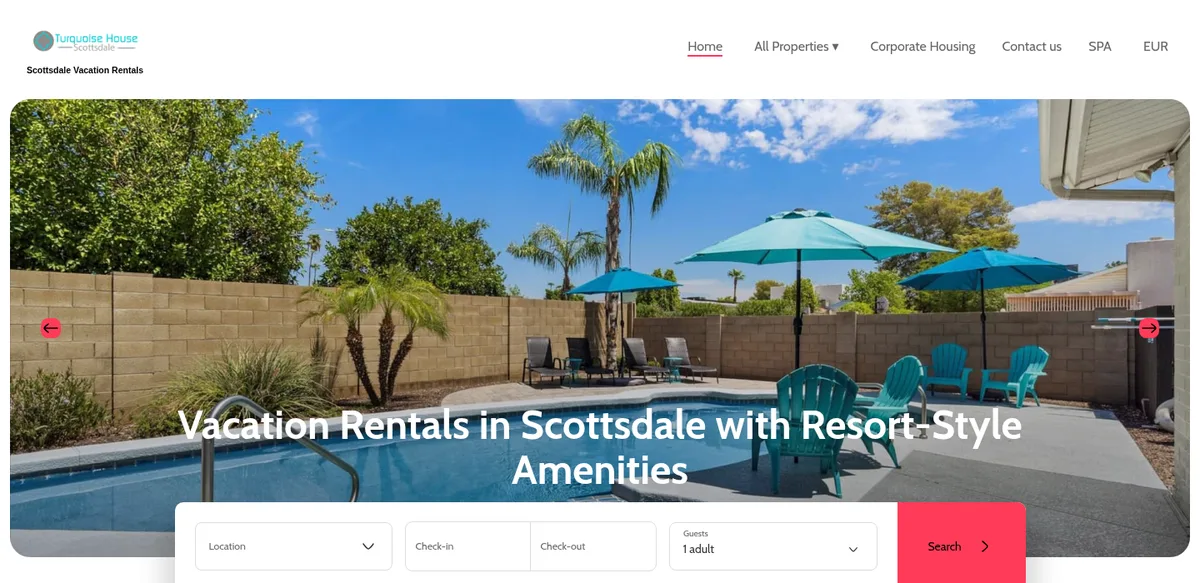
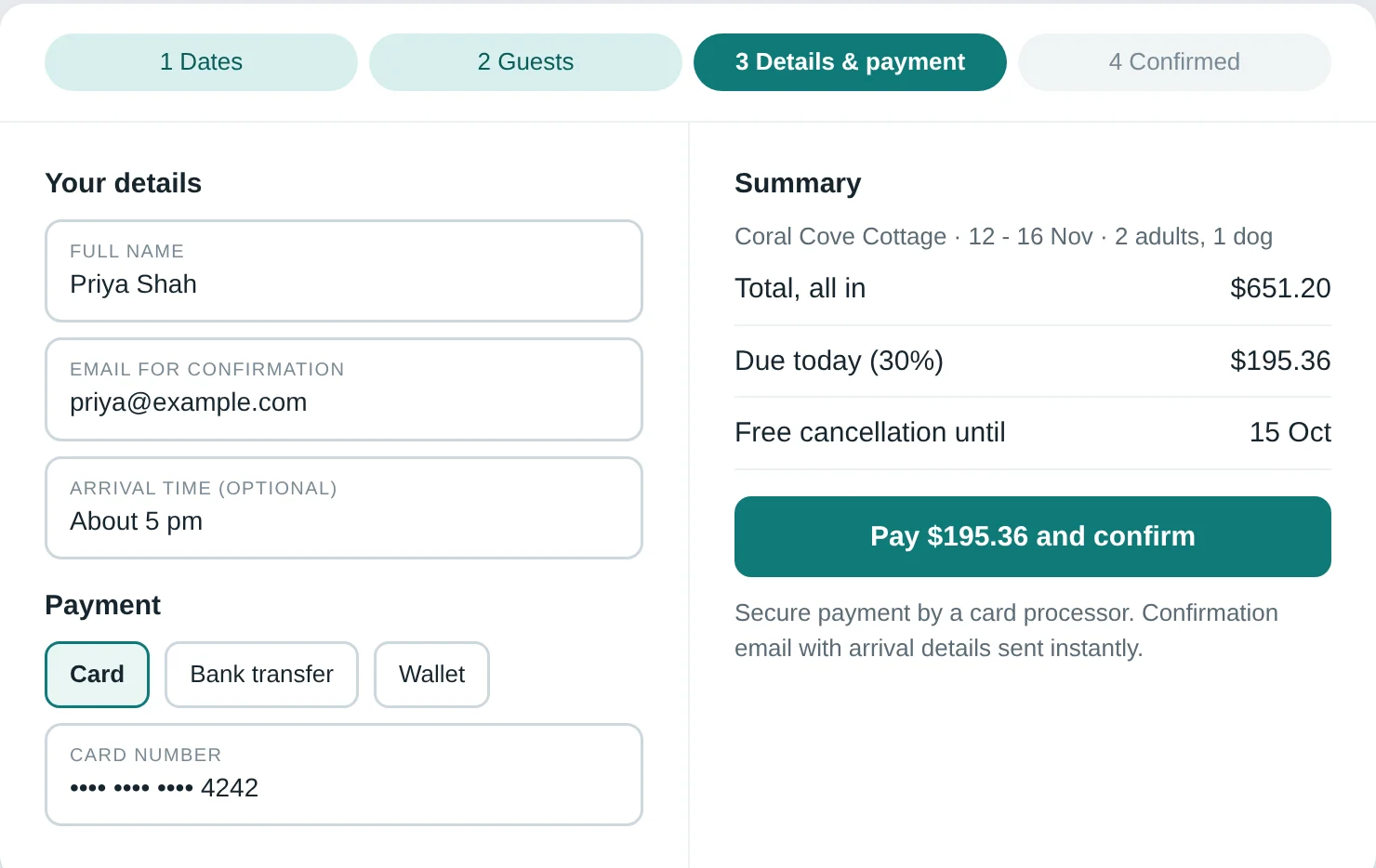
The example screens in this guide are mock-ups of a fictional coastal rental, "Coral Cove Cottage", designed by AccomStack to show each idea. The one screenshot of a real site is credited under the image.
1. Is this place real? Photos that tell the truth
Photos do the first job of the site. Guests scan the gallery before they read a word. Show every room, the bathroom, the kitchen with what is actually in the cupboards, the bed close up, the outdoor space, and the view from the windows and from the street. Put the best image first, then order the rest the way a visitor would walk through the door.
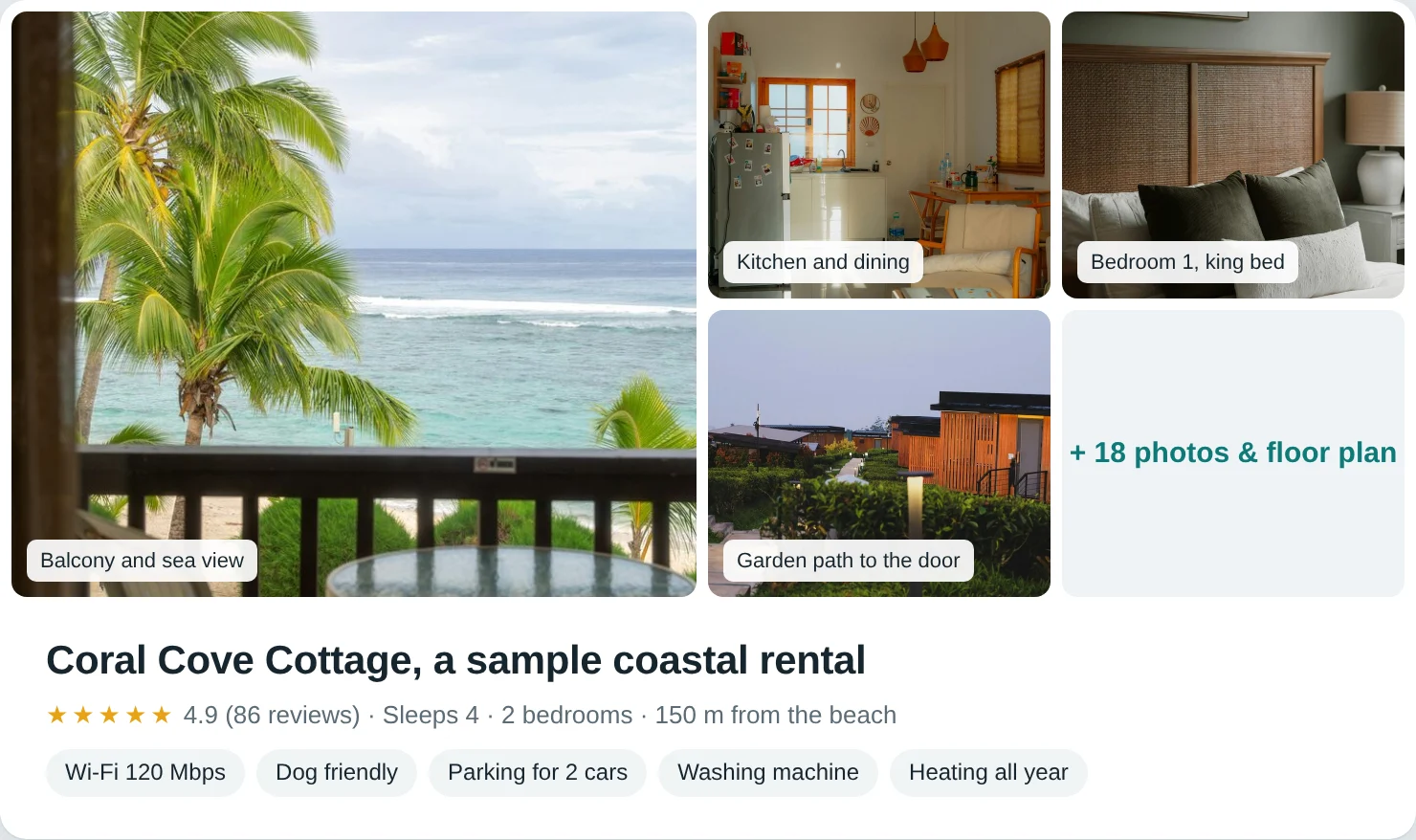
Honesty converts better than polish. A guest who sees a lived-in kitchen and a clear shot of the fridge trusts the rest of the page. A guest who arrives to a room that looks smaller than the gallery asks for a refund and writes a review. Add short, specific captions ("Second bedroom, sleeps two, window faces the garden") and write real alt text for each image, because that text helps both search engines and screen-reader users.
2. What does it cost, all in? Show the full price early
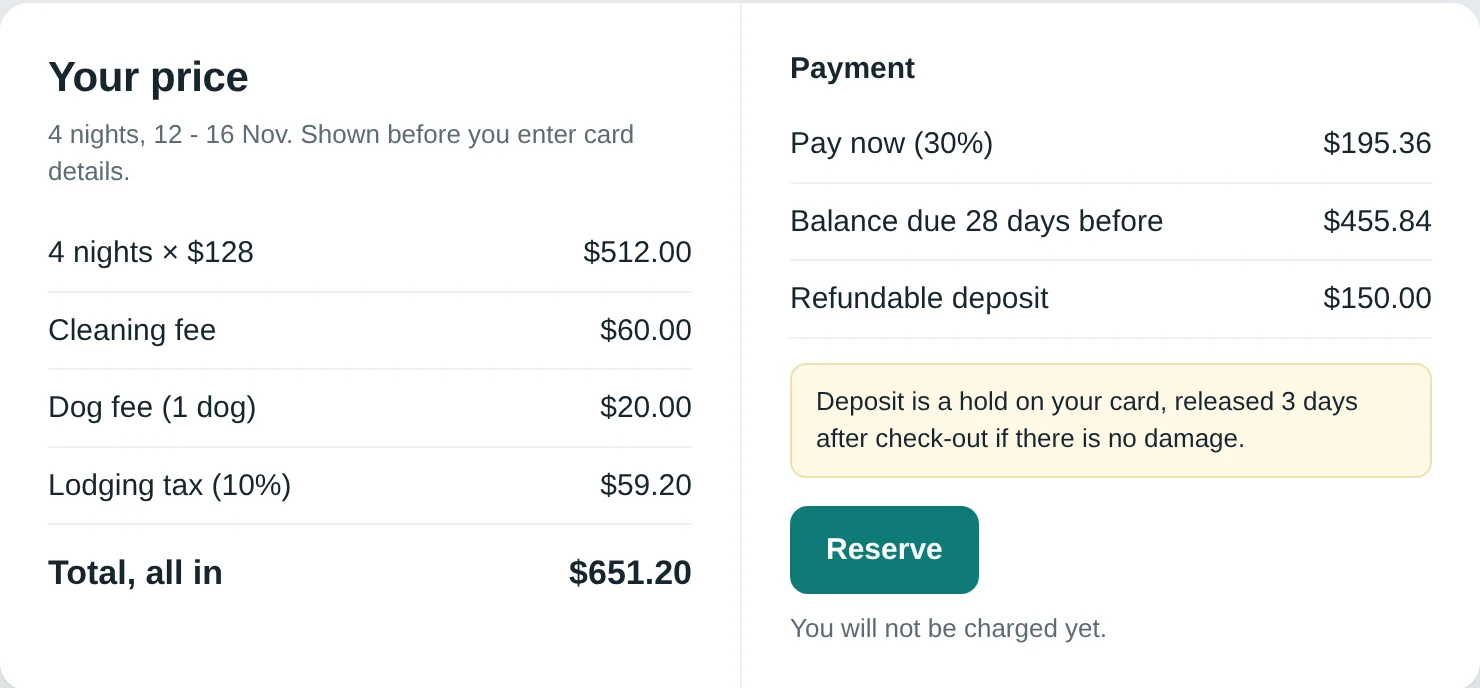
Surprise fees are the fastest way to lose a booking. Cleaning fees, taxes, pet charges and deposits should appear in the price summary before the guest enters card details, ideally the moment they pick dates. Show the nightly rate, the cleaning fee, taxes and the total on one line each. If you charge a refundable damage deposit, say how much, when it is taken and when it is returned.
Pricing language matters too. "From $140 per night" is fine on a search page, but only if the property page shows what the real total looks like for a typical stay. Guests who compare you with a marketplace are comparing totals.
3. Is it free on my dates? A live calendar
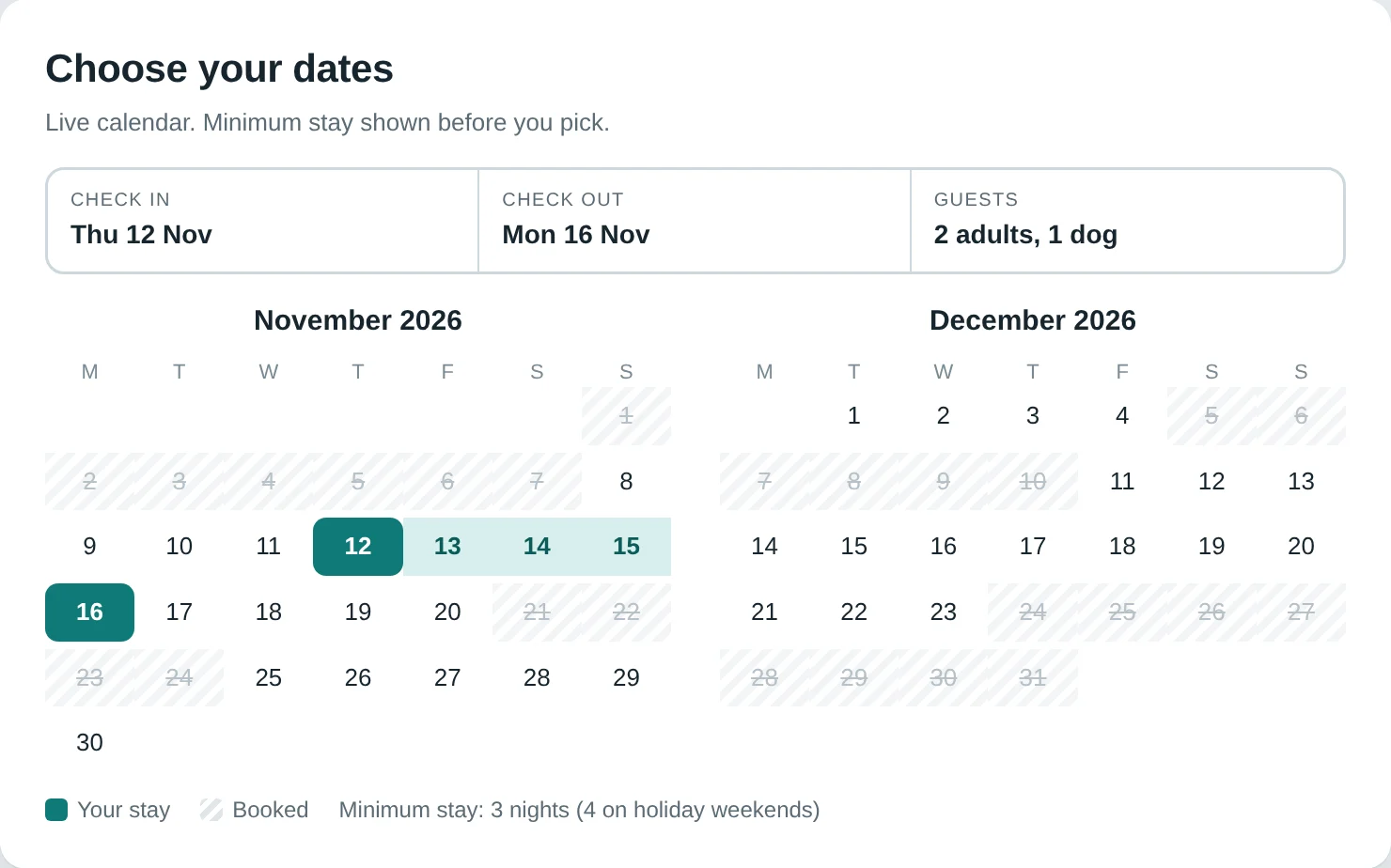
A calendar that is out of date is worse than none, because a double booking costs you the stay and your reputation. Use a calendar that syncs from your property management system or channel manager, so a booking on any channel blocks the same nights everywhere. Show minimum stay rules on the calendar itself, not in a footnote, and make the date picker work well on a phone because most browsing happens there.
4. Can I trust the host? Reviews, a human story and real details
Trust is the whole game on a direct site, because guests lose the marketplace's safety net. Build it in layers:
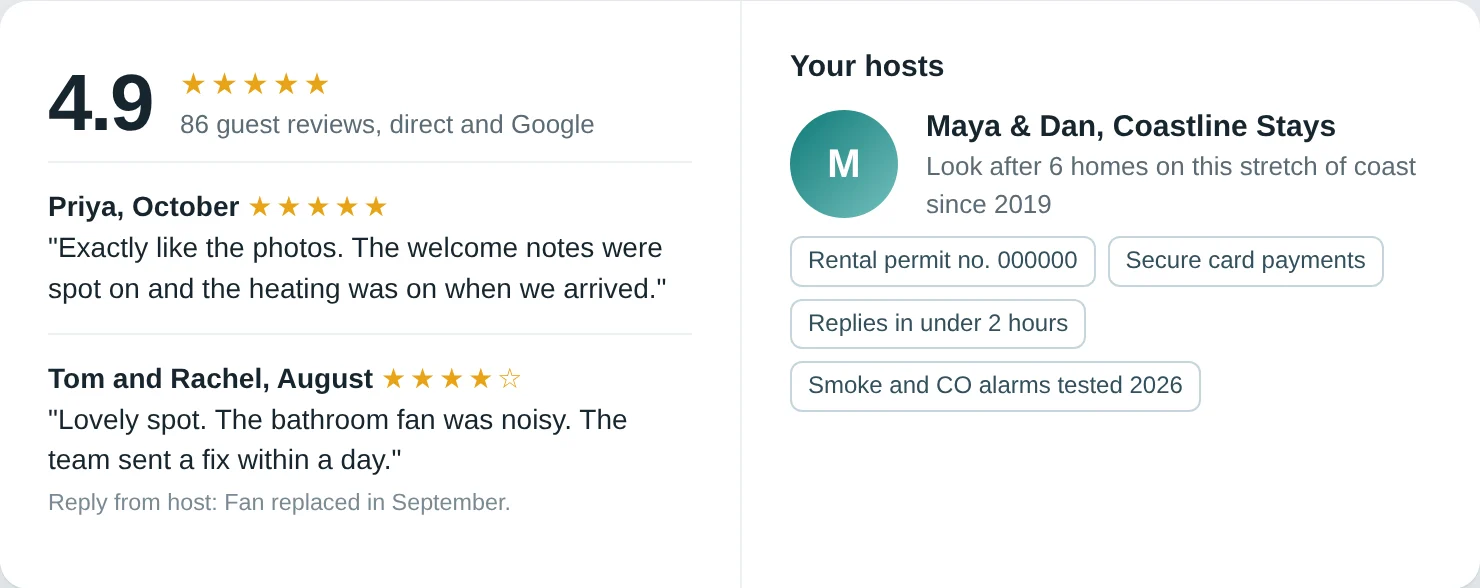
- Reviews. Quote guest reviews with first names and stay month, and link to the original where the platform allows it. Never invent or edit a review. A short, honest "what guests mention" summary beats a wall of five-star lines.
- A host or team page. Two paragraphs and a real photo of you or your team. Say who you are, how many homes you look after and what you do when a guest has a problem.
- Business basics. Legal business name, contact details and, where your area requires one, your registration or licence number. Rules differ by place. Our guides to NYC Local Law 18 and England's short-term let register show two examples.
- Secure checkout signals. The padlock is not enough. Show the payment methods you accept, who processes the card and what the guest is agreeing to.
5. Where exactly is it? Location and the area guide
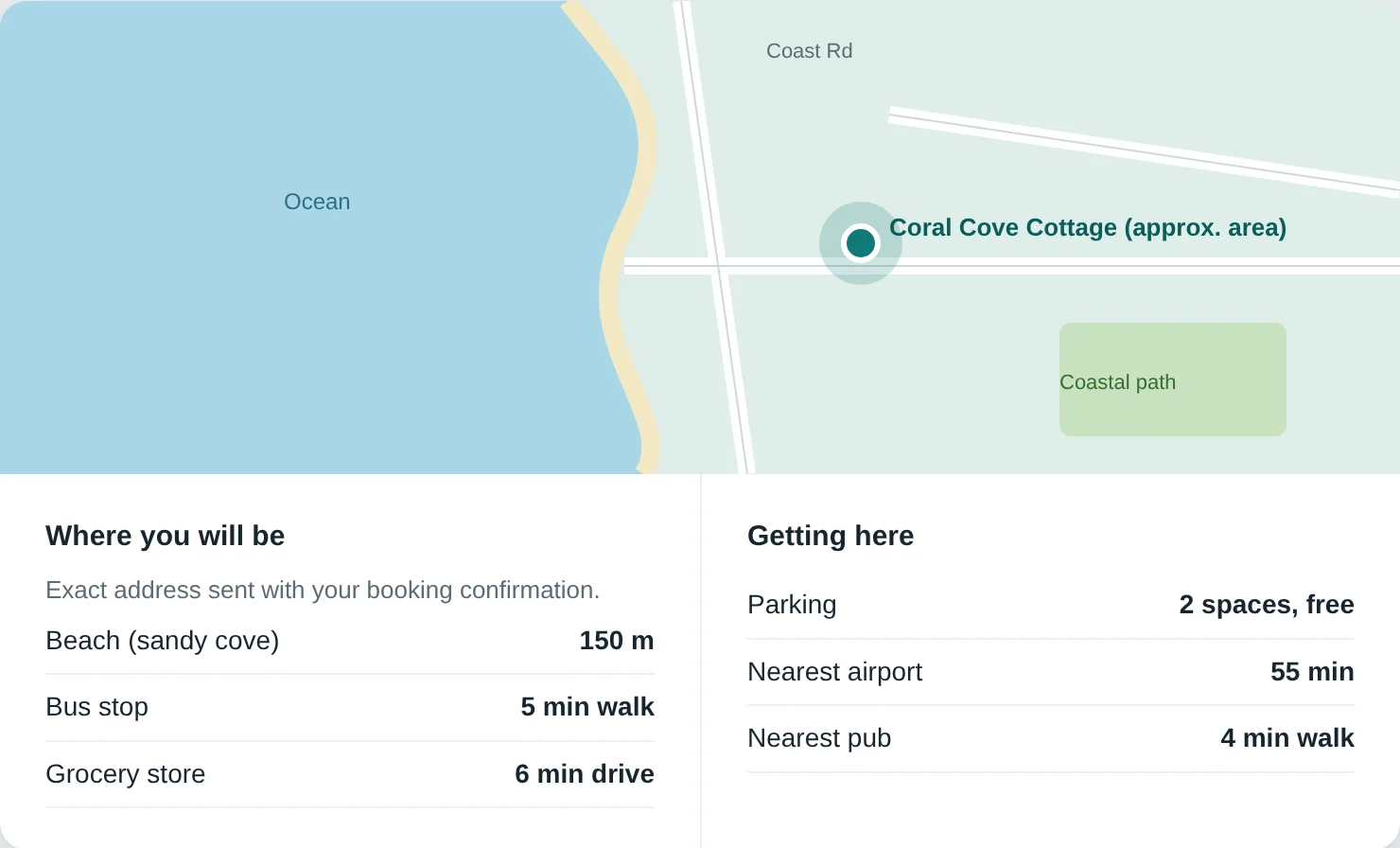
Guests want the neighbourhood, not just the pin. Give the exact area (many hosts share the precise address only after booking, which is fine, but say so), then answer the things they will otherwise search for: how far to the beach, the train station or the conference centre, where to park, where to buy groceries, what is open late.
The area guide is also your best SEO asset. A page titled "Things to do near [your town] in autumn" attracts people who are not yet looking for a rental, and it can link straight to your booking page. Write it from experience, with named places you actually recommend.
6. What are the rules? House rules in plain language
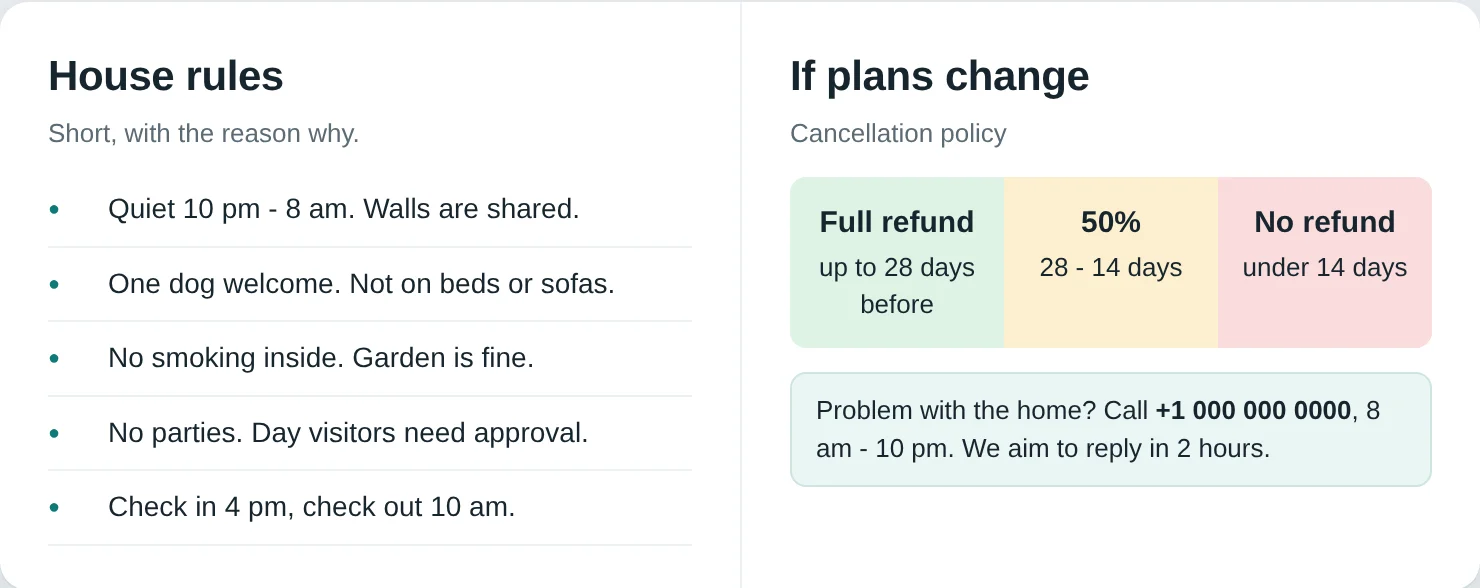
Put quiet hours, pet policy, smoking, party and visitor rules, check-in and check-out times and parking in one short section. Explain the reason when you can ("quiet after 10 pm, the building shares walls"). Guests accept rules that make sense and resent rules that read like a legal threat. Keep the long legal terms on a separate page and link to them.
7. What if something goes wrong? Cancellation and support
This is the question guests do not say aloud, and the answer they most want. State your cancellation policy in a short table: full refund until a date, partial until another, none after that. Explain what happens if the home is not as described, or a pipe bursts the night before arrival. Name a contact, give a phone number or messaging app, and state your response time, such as "we reply within two hours between 8 am and 10 pm local time". Only promise what your team can keep.
8. How do I get in? Arrival, check-in and parking
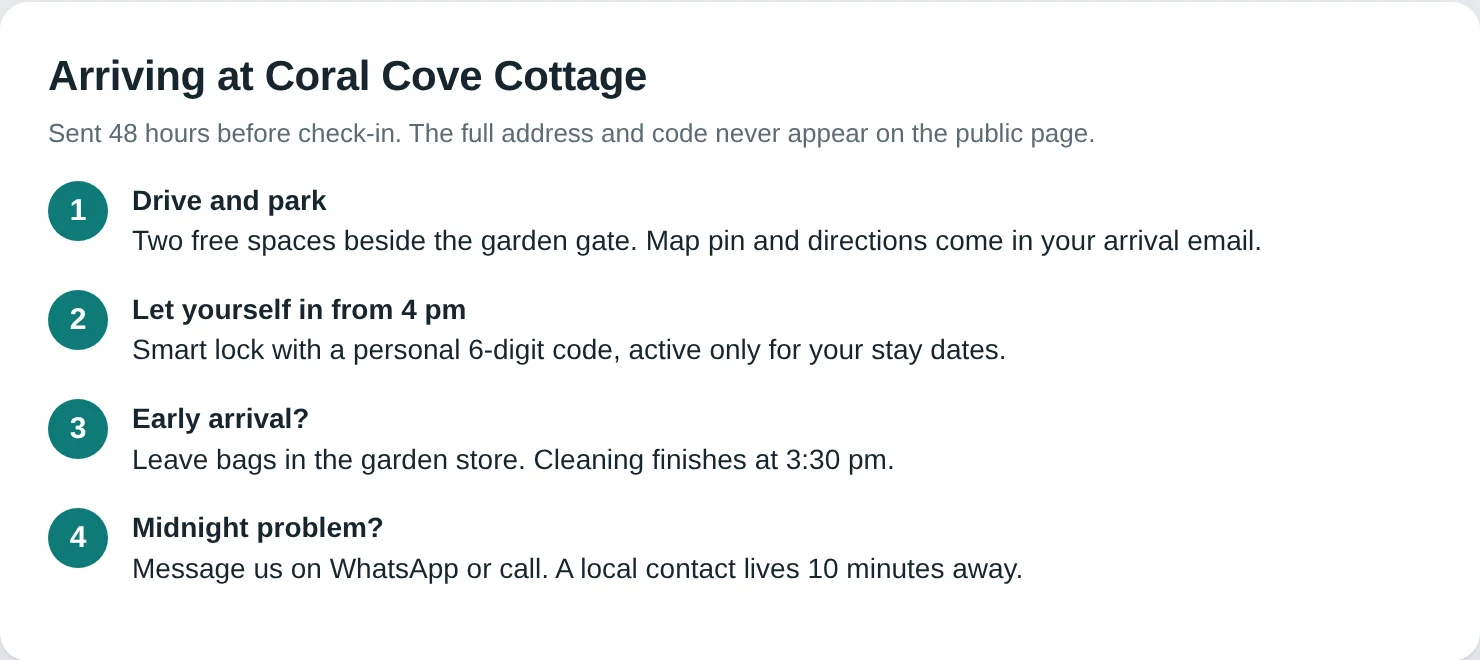
Many guests worry about arrival more than the stay. Describe what happens: self check-in with a code or smart lock, a meet-and-greet, a key box. Say when the instructions arrive. Include the first few details that cause friction: step-free access, stairs, where to leave luggage on an early arrival and how to reach someone at midnight. Do not publish door codes or the full address on the open page.
9. Can I ask first? A contact route and a real FAQ
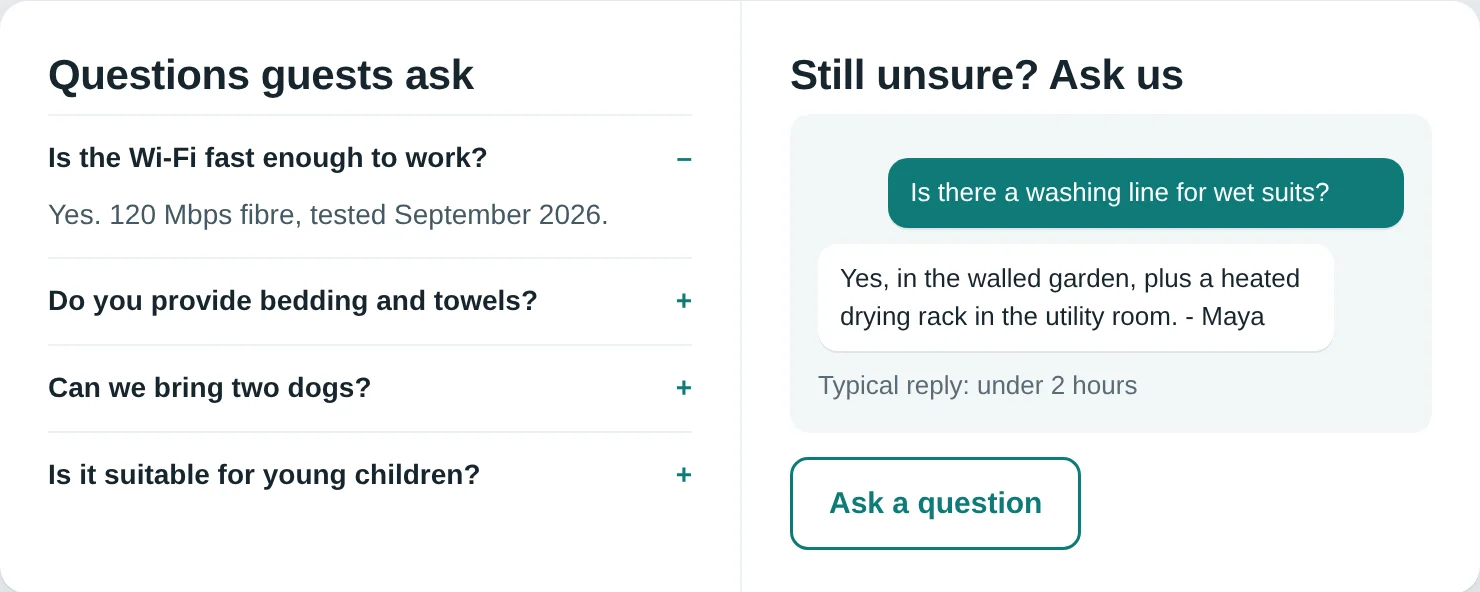
Some guests will not book until a human has answered a question. Make that easy: a visible "Ask a question" button, a contact form that goes to a monitored inbox and a messaging link if you actually staff it. Then use the questions you receive to build the FAQ. A good rental FAQ covers bedding and sleeping arrangements, Wi-Fi, heating or air conditioning, children and pets, long stays, accessibility, late arrival and what is nearby. Every question you answer in text is one fewer email and one more guest who feels looked after.
10. Is paying here safe and easy? A short checkout
Keep checkout to as few steps as you can: dates, guests, details, payment, confirmation. Ask only for what you need. Use a recognised payment processor that supports the major cards and local wallets for your guests, show the total again on the payment step and send a confirmation email that restates the dates, price, cancellation terms and check-in details. Test the whole path on a phone, on slow mobile data, with a real card, before you launch.
Choosing a platform: build, or use what your PMS offers
You do not need to code a booking engine. Handling payments, calendars, taxes and double-booking prevention well is hard, and the platforms below have already done it. Most connect to a channel manager, so your calendar stays in sync across marketplaces and your own site. The five below are well-known options that offer a direct booking site or website builder for short-term rental operators. Features and pricing change, so check each vendor's current plans, and test the free trial where one exists.
| Platform | What it offers | Likely fit |
|---|---|---|
| Lodgify | Channel manager, direct booking engine and website builder in one product2 | Hosts and small managers who want one tool and a ready-made site |
| Hospitable | Direct booking site with payments, guest screening and property protection3 | Hosts already automating messaging who want guest screening built in |
| Hostaway | No-code website builder, plus an open API for custom builds4 | Growing managers who may later want a custom front end |
| OwnerRez | Channel management and websites; says it does not charge a percentage of revenue5 | Independent operators who want software pricing that is not tied to booking revenue |
| Uplisting | Channel sync and a direct booking site, with rates that adjust for channel commissions6 | Small portfolios that want pricing control across channels |
This is a starting list, not a ranking, and we have no commercial relationship with any of them. When you compare, ask five questions: does it sync with the channel manager or PMS I already use, can I control the page structure and URLs for SEO, which payment processors does it support in my country, how does it handle taxes and fees, and can I export my guests and bookings if I leave?
If you can build: a custom front end on a static or PHP site, wired to a PMS booking engine through its API, gives you full control of design and speed. It also gives you more to maintain. Do it when you have a clear brand and several properties, not for a first site.
SEO that works for a rental website
Search engines reward pages that help the person searching7. For a rental site that means a few practical habits.
- One page per property, one clear topic per page. Use a descriptive title such as "Two-bedroom cottage in Whitby, sleeps 4" and a single H1. Use H2s for sections like Rooms, Location, House rules and FAQ.
- Write your own copy. Do not paste the description from Airbnb or from another host. Duplicate text gives a search engine no reason to prefer your page.
- Title tag and meta description for every page. Keep titles short enough to read in results and write the description as a one-sentence reason to click.
- Descriptive image alt text and fast images. Compress photos, use modern formats such as WebP and size them for the screen. Google's guidance for a good experience is a Largest Contentful Paint of 2.5 seconds or less, an Interaction to Next Paint of 200 milliseconds or less and a Cumulative Layout Shift of 0.1 or less8.
- Local content. Area guides, seasonal itineraries and event pages bring in readers who are planning a trip and link back to your bookable homes.
- Clean URLs and internal links. Link from guides to properties and back. Keep one canonical URL per page.
- Structured data, with realistic expectations. Google's vacation rental markup is currently limited to sites that have connected with Google through its program9. Without that connection, add proper Organization and page metadata and do not expect a special listing from markup alone.
- Measure. Install analytics, set up Google Search Console and track which pages bring bookings, not just visits.
A launch checklist you can copy
- Write down your ten guest questions and where each is answered.
- Photograph every room and the outside, in daylight, and write captions and alt text.
- Show the all-in price, taxes and deposits before payment.
- Connect the calendar and test a booking on another channel to confirm the dates block.
- Add reviews, a host page, business details and any licence or registration number your area requires.
- Publish house rules, the cancellation policy, arrival steps and an FAQ.
- Complete a real booking on a phone, and refund it.
- Set up analytics, Search Console and a sitemap.
- Add the site link to your marketplace profiles where the rules allow it, to every confirmation message and to your email signature.
- Offer returning guests a reason to rebook directly, such as early access to your calendar or a small perk you can afford.
Our recommendation
If you run fewer than about ten homes, use the website builder inside the PMS or channel manager you already pay for, and put your time into the ten questions above. A fast, honest, well-photographed site on a standard platform beats a clever custom build with weak content. If you do not yet have a PMS, shortlist two of the platforms above, run each on a free trial against the five questions, and pick the one where you can control page titles, URLs and photos.
Move to a custom front end only when the platform's limits start to cost you bookings, for example when you cannot edit the page structure or you want content-led pages the builder cannot produce. Keep marketplaces in the mix while you build trust: the goal is a growing share of direct bookings, not leaving the marketplaces overnight.
Start this week with the cheapest, highest-impact step: write the ten questions and answer each one on your current site.
Find out what direct booking is worth to you
Free direct booking savings calculator. No signup.
Sources
- Airbnb Help: Airbnb service fees (split-fee and single-fee structures)
- Lodgify: official site (channel manager, direct booking engine, website builder)
- Hospitable: Direct booking (site, payments, guest screening, property protection)
- Hostaway: Direct booking website builder
- OwnerRez: official site (channel management and websites)
- Uplisting: official site (channel sync, direct booking site, commission-adjusted rates)
- Google Search Central: Creating helpful, reliable, people-first content
- web.dev: Web Vitals (Core Web Vitals thresholds)
- Google Search Central: Vacation rental (VacationRental) structured data
Last checked 1 October 2026. Platform features, pricing and search guidance change; confirm on each vendor's site before you decide. The mock-up screens are our own illustrations of a fictional property. Photos (the lead image and those inside the gallery mock-up) are by Colton Jones, Max Bvp, Clay Banks and Stanley Kustamin on Unsplash, used under the Unsplash License. The one real-site screenshot is credited in its caption. This article is general information, not legal, tax or financial advice, and we have no commercial relationship with the platforms named.